|
Supported Axes: |
Pressure/Force Control Axes |
See the Commands Overview topic for basic command information and how to issue commands from PLCs, HMIs, etc.
Command Parameters
|
# |
Parameter Description |
Range |
|---|---|---|
|
1 |
Requested Pressure/Force (Pr or Fr) |
any |
|
2 |
Ramp Type
|
A valid integer as described |
|
3 |
Time for Ramp (sec) |
≥ 0 |
|
4 |
Integrator Preload (%) |
-100% to 100% |
Description
This command enters pressure or force control and then ramps to the requested Pressure or Force in the specified Time for Ramp. A Linear Ramp Type will ramp the pressure or force linearly until it reaches the Requested Pressure/Force. An S-curve Ramp Type will provide a half s-curve ramp to the Requested Pressure/Force.
Upon entering pressure or force control, the Target Pressure or Target Force will be set to the Actual Pressure or Actual Force. The Target Pressure or Target Force will then be ramped to the Requested Pressure/Force in the specified Time for Ramp.
This command may cause the pressure/force rate to change suddenly at the transition, as shown in the plot in the example below. If this is a problem, try using a shorter Time for Ramp, or consider using the Enter Pressure/Force Control (Auto) (44) command, which will automatically ramp at the current Actual Pressure/Force Rate (depending on the tuning), eliminating the sudden change in rate. Another option is to create a user program that issues the Hold Current Pressure/Force (19) command, then immediately issues the Ramp Pressure/Force (S-Curve) (41) command.
The Integrator Preload specifies the value that the Integral Output Term should be set to when transitioning into pressure/force control. The Preload is specified as a percentage of the Output Scale (typically 10V), and is not affected by the pre-transition integrator state. Typically, this can be left at the default value of 0. If the pressure/force exhibits a drop upon entering pressure/force, increase this value to help smooth the transition.
Example
Consider a hydraulic press that must move toward the material to be pressed, transition to pressure control and hold a certain pressure.
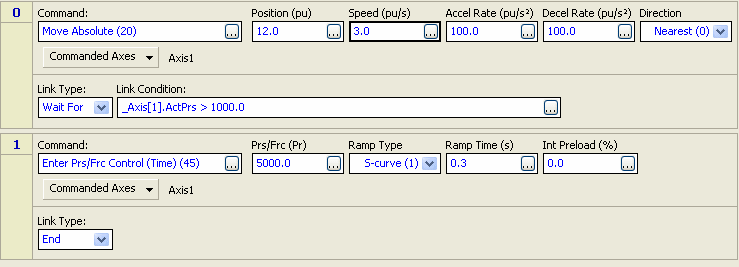
The user program below shows a possible sequence of steps.
Step 0 issues a Move Absolute command to move the axis to a position beyond where it expects to encounter the material. The Step 0 Link Type waits for the Actual Pressure to exceed 1000, then it goes to Step 1 which issues an Enter Pressure/Force Control (Time) command with an S-Curve Ramp Type. The axis will transition to pressure control and go to the Requested Pressure/Force of 5000.
The plot below shows the transition:
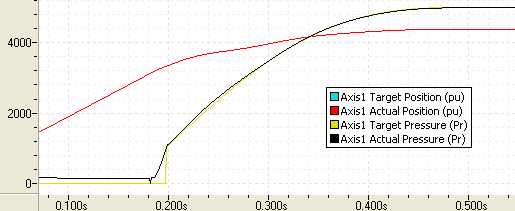
At the beginning of the plot, the position is increasing. At 0.18 seconds, the Actual Pressure starts increasing. When the Actual Pressure reaches 1000 at approximately 0.2 seconds, the Enter Pressure/Force Control command is issued, the axis transitions to pressure control, and then the Target Pressure ramps to 5000.
Exiting Pressure/Force Control
To exit pressure/force control, send any open-loop command or closed-loop position command to the axis.
Status Bits
At Pressure/Force
When the axis is in Pressure or Force control and the Target Pressure or Force reaches the Requested Pressure/Force and the Actual Pressure or Actual Force is within the At Pressure/Force Tolerance window from the Target Pressure/Force, the At Pressure/Force Status bit will be set. This bit indicates that the ramp is complete and the axis is at the pressure or force.
Pressure/Force Control
The Pressure/Force Control Status bit indicates that the axis is in closed-loop pressure or force control.
Pressure/Force Target Generator Bits
The Pressure/Force Target Generator bits in the Status Bits register indicate which portion of the move the axis is currently in. These bits are useful when programming complex motion sequences.
Pressure/Force Target Generator Done bit
This bit indicates that the Target Pressure or Target Force has reached the Requested Pressure/Force. If the ramp is interrupted, e.g. due to a halt, the done bit will not be set because the commanded motion was not completed. Notice that this bit does not indicate whether the Actual Pressure or Actual Force has reached the Requested Pressure/Force.
Pressure/Force Target Generator State A and B bits
|
B |
A |
Description |
|---|---|---|
|
0 |
0 |
Pressure/Force is stopped (done) |
|
0 |
1 |
Pressure/Force is increasing |
|
1 |
0 |
Reserved |
|
1 |
1 |
Pressure/Force is decreasing |
See Also
See Also
Enter Pressure/Force Control (Auto) (44) | Enter Pressure/Force Control (Rate) (46) | Ramp Pressure/Force (S-Curve) (41) | Ramp Pressure/Force (Linear) (42) | Stop Pressure/Force (43) | Hold Current Pressure/Force (19) | Pressure/Force Control Overview | List of Commands | Commands Overview
Copyright © 2026 Delta Computer Systems, Inc. dba Delta Motion